ZyptAI Meetings
Every project meeting across Teams and Outlook. Every decision made. Captured automatically, fed into your project knowledge base, searchable forever.
One platform surface. Shared project memory. Shared identity, governance, and audit.Meeting Capture, As Screenshots
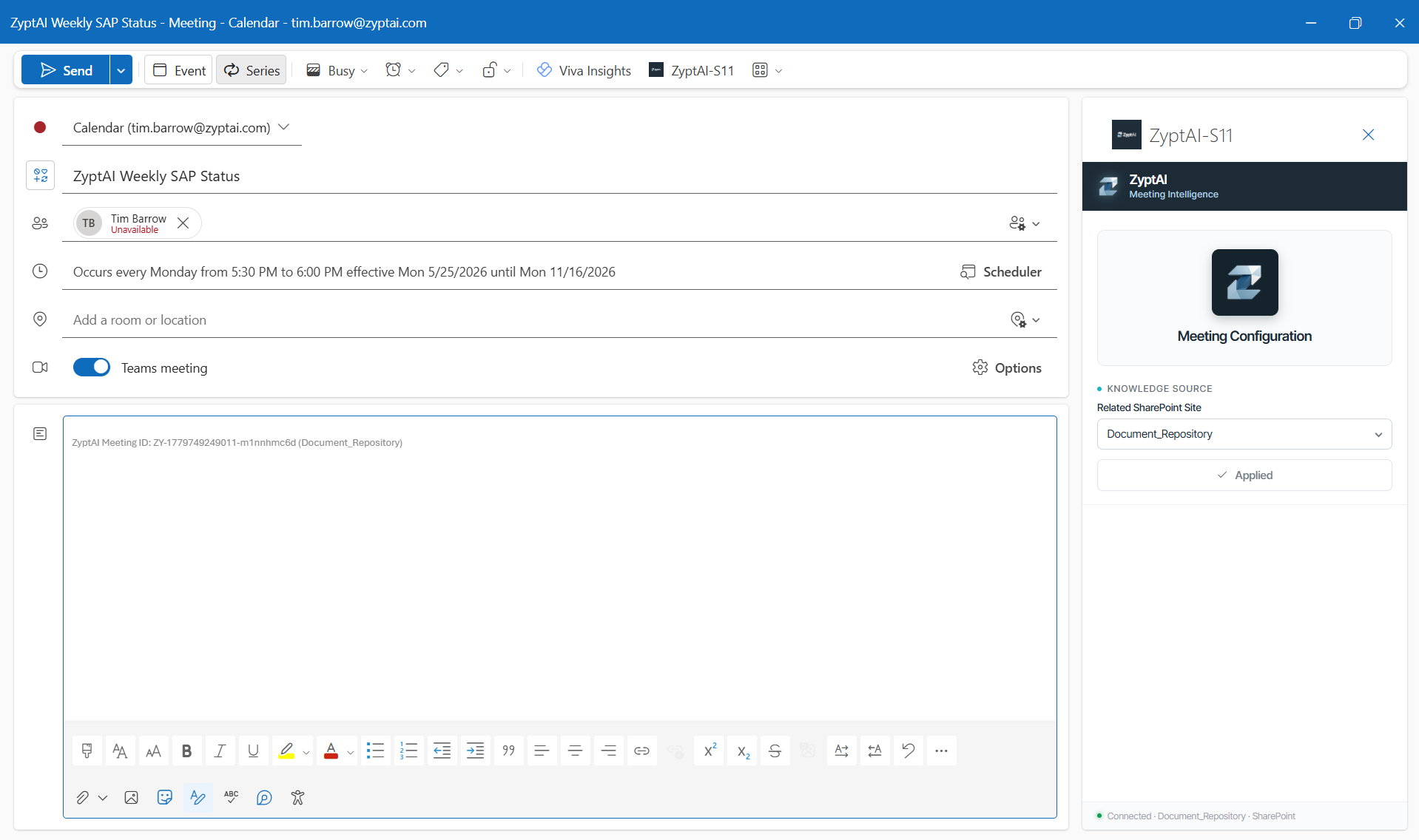
Configure meeting intelligence from the organizer
The ZyptAI add-in surfaces directly in the Outlook meeting organizer. Link a SharePoint knowledge source before the meeting starts so transcripts and decisions are indexed against the right project the moment the recording ends.
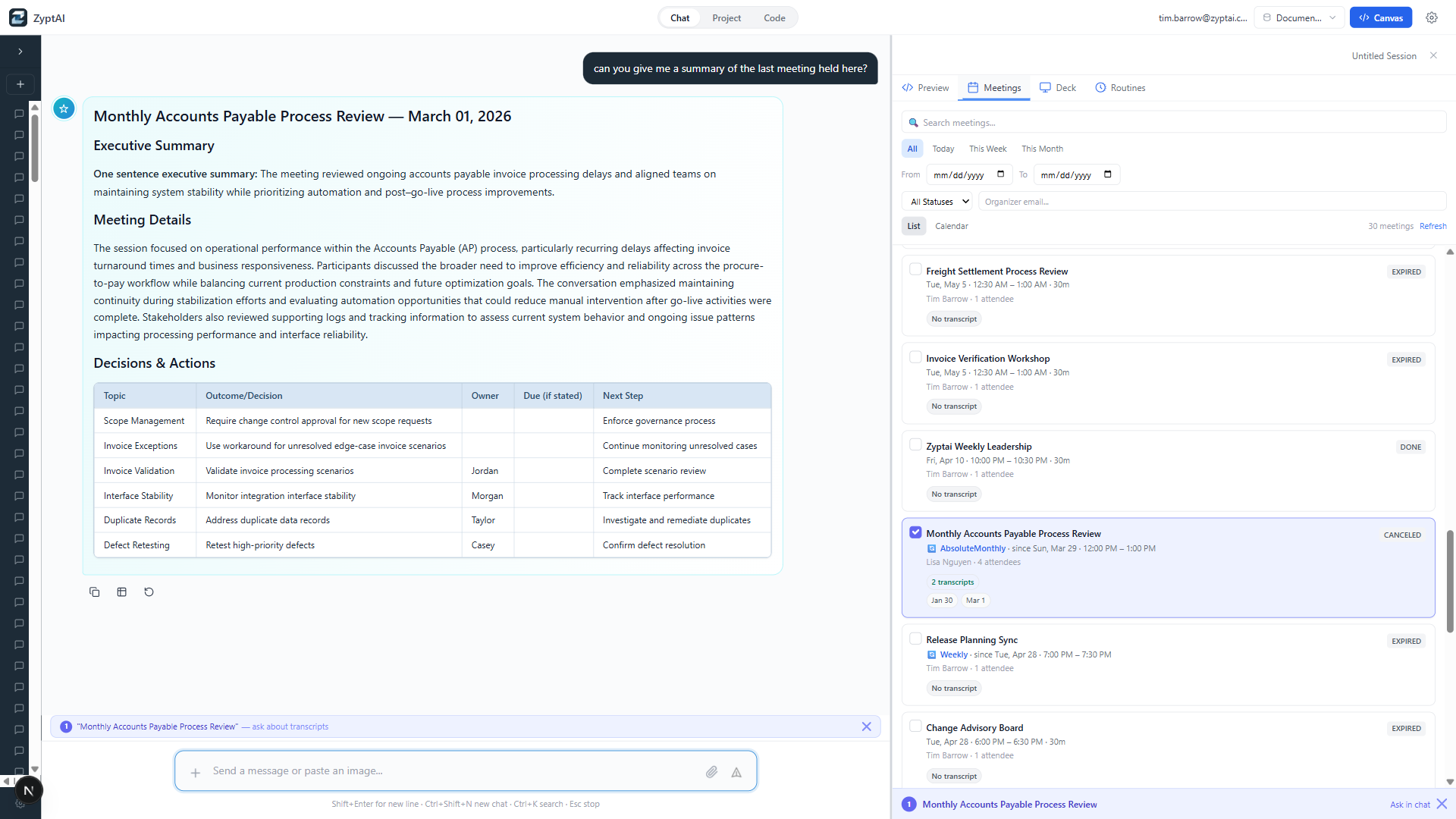
Ask for a meeting summary, get a structured brief
One question — 'summarize the last meeting held here' — returns an executive summary, meeting details, and a decisions-and-actions table. The Meetings panel alongside shows every captured meeting with its transcripts, searchable and filterable.
Zero Effort Transcription
Meetings recorded through Teams or Outlook are automatically picked up by ZyptAI Meetings. No manual upload, no copy-paste. The transcript is processed and indexed within minutes of the meeting ending.
What Was Agreed. Highlighted.
AI scans each transcript and tags key decisions — "Agreed to use material type HALB for semi-finished goods", "Cutover date confirmed as Q4 weekend". Decisions are surfaced and searchable separately from the full transcript.
Tasks Surface Automatically
Commitments made in meetings — "Tim to send the revised blueprint by Thursday" — are extracted as action items with owner and due date. Never lose a follow-up in a 90-minute transcript again.
Who Said What, Preserved
Transcripts retain speaker labels throughout. When searching for a decision, you see exactly who made it and in what context — not just the raw text.
Meetings Become Objects You Can Query Later
A workshop from six months ago or the cross-functional meeting where a key design choice was made becomes a tracked object in Project Memory, available for query instead of disappearing into a calendar archive.
Use Meetings in Routines and Alerting
Captured meetings can feed routines and alerts, so teams can watch for specific workshop types, decisions, or cross-functional events instead of relying on someone to remember they happened.
Why Not the Alternatives?
Other tools exist. None were built for SAP teams inside Azure.
A consultant spends 30-60 minutes writing minutes after every workshop. Quality varies. Critical decisions buried in paragraph four of a long document.
Generic summary with no SAP project context. Requires M365 Copilot licensing. Recap stays in Teams — not searchable from Word or your test platform.
Third-party SaaS tools that process your confidential project content on external infrastructure. Not acceptable for many enterprise clients.
The actual reality for most projects. Decisions made verbally are forgotten or disputed. Scope creep goes undocumented. Go-live risk increases.
Automatic transcript capture, decision extraction, and action item tracking flowing into the shared project knowledge base. No manual minutes, no lost decisions, and no disconnected meeting archive.