ZyptAI Assistant
Start in one chat surface. Ask project questions, retrieve meeting decisions, draft delivery content, and use the chat-native tools that run on the same cited SAP context.
One platform surface. Shared project memory. Shared identity, governance, and audit.Start in chat, then use the right built-in action when the task needs output.
Assistant is the entry point to the platform. Ask for context, decisions, drafts, or outputs in plain English, then use the chat-native tools available for that workflow.
What can I ask it?
Assistant stays grounded by scoping to the right project repository first, then answering or using the available chat actions for Fiori mockups, charts and graphs, routines, PPTX decks, Word documents, and Excel documents.
Ask the Project What It Already Knows
Ask anything your project has already documented. Assistant synthesises answers from SharePoint, meeting transcripts, requirements, and delivery records with citations.
Pull Back the Original Meeting Context
"What did we discuss about batch job scheduling in last month's BASIS workshop?" Assistant retrieves the relevant transcript excerpt and summarises the key points without forcing anyone back into recordings.
Draft the Deliverable Before You Open the Template
Need a cutover runbook, training guide, steering summary, or test preparation checklist? Describe the deliverable and Assistant drafts the first version from project context.
Use the Chat-Native Output Tools That Already Exist
From the same grounded conversation, Assistant can open Fiori mockups, charts and graphs, routines, PPTX decks, Word documents, and Excel documents without leaving the context thread.
Start here, then go deeper only where the work demands it.
Assistant is the fastest way into the platform: ask once, stay grounded in the same project memory, and use the available chat tools when the task needs a concrete output.
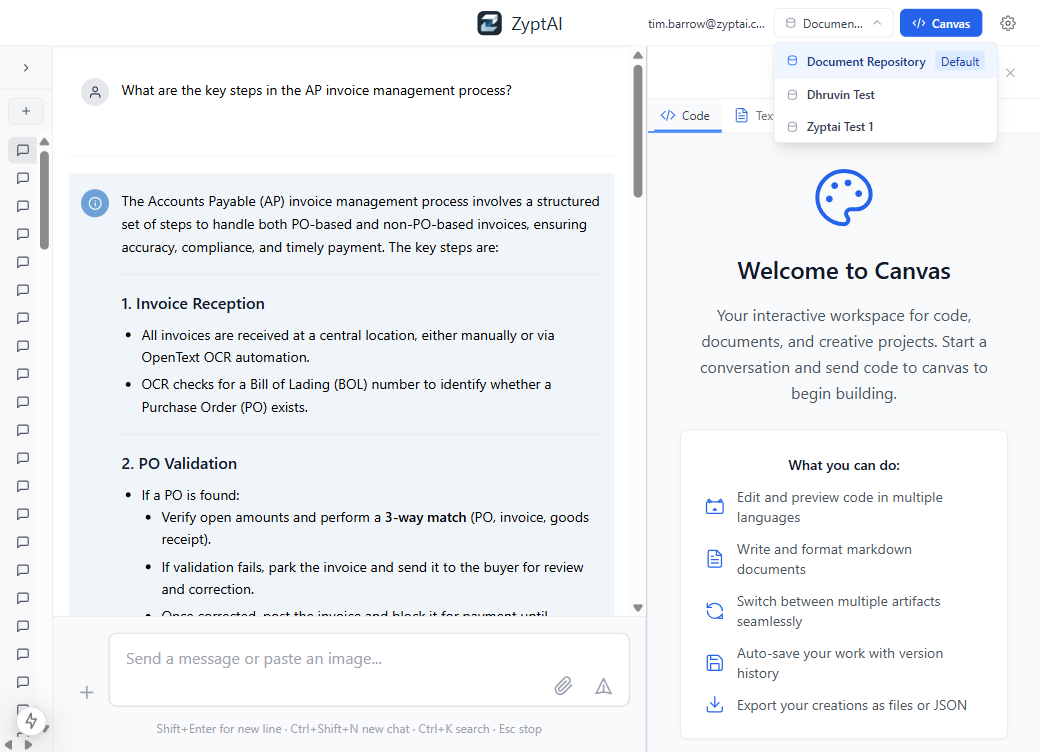
Scope the question to the right engagement first
Assistant can stay grounded because the user picks the right project repository before asking. That keeps responses tied to the right workstream and delivery corpus.
Why Not the Alternatives?
Other tools exist. None were built for SAP teams inside Azure.
No access to your project data. Generic responses with no SAP context. Confidential project content sent to third-party AI infrastructure.
Better SharePoint integration but generic AI, no SAP-specific capabilities, no PowerPoint generation from project knowledge, and $30/user/month additional cost.
SAP's own AI assistant covers S/4HANA transactions but has no awareness of your specific project, your documents, or your team's decisions.
Consultants context-switch between SharePoint, PowerPoint, Lucid, Teams, and Jira to produce deliverables. Hours of assembly work that adds no client value.
One conversational entry point for project Q&A, meeting retrieval, drafting, and chat-native tool actions — all grounded in the same shared project knowledge as the rest of the platform.